Self-hosted · BullMQ & BullMQ Pro

The BullMQ dashboard you can put in front of production.

One container next to your stack. Queues, jobs, failures, progress, logs, flows and Pro groups, behind a real login. No KEYS, one round trip per screen, payloads truncated inside Redis before they travel.

Install the free edition See Pro pricing Free core, MIT-style honesty: Pro features are shown locked, never hidden.
# 1. run it next to the Redis your workers already use
docker run -d --name bullpane -p 3000:3000 \
  -e SESSION_SECRET=$(openssl rand -base64 32) \
  -e DATABASE_URL=mysql://user:pass@mysql:3306/bullpane \
  ghcr.io/madmorett/bullpane:latest

# 2. open http://localhost:3000, create the admin, add a Redis connection
# 3. that's the whole install. Pro is a key you paste in Settings → License.
 works with Redis, Redis Cluster, Valkey · BullMQ 4/5 and BullMQ Pro

Built by Matheus Morett, CTO at Monest · 100M+ BullMQ jobs a day in production. Every feature here shipped because we needed it first. @Morett_the_best

How it compares

bull-board is free but has no login. Taskforce.sh is the hosted dashboard from the BullMQ authors: polished, but your job data leaves your network and you pay per connection. Bullpane is the third option: self-hosted, safe on production, priced per installation.

IncludedPro Included in Bullpane Pro Not available
bull-boardopen source Taskforce.shhosted SaaS Bullpaneself-hosted
Job data stays in your networkpayloads go to their cloud
Login
Users & rolesPro
Search inside job data
BullMQ Pro groups & batches
Alerts to Slack / webhookPro
Audit log in your own databaselives in their accountPro
Flow graphPro
PriceFreeMonthly, per connectionFree · Pro $19/mo per installation

Free, and complete

The free edition is not a trial. It does everything the open-source dashboards do, on unlimited connections and queues, and it is built for the Redis that runs your business.

Every queue, every state

Waiting, active, delayed, prioritized, completed, failed, paused. Per-minute completed/failed rates. Attention view surfaces the queues that need you.

Jobs you can actually read

Data, options, progress, logs, stack traces, parent/child links. Search inside job data. Add, retry, promote, remove, discard, in bulk if you like.

Queue operations, with guard rails

Pause, resume, clean, retry-all, drain and obliterate. The destructive ones need the admin role and are recorded.

BullMQ Pro aware

Groups, batches and group-level concurrency are first-class. Job schedulers are listed and removable.

Built for production Redis

No KEYS. Discovery via SCAN, cached. One Lua round trip per queue, payloads truncated inside Redis. Cluster-safe.

Real login, read-only mode

Admin account with sessions. BULLPANE_READ_ONLY=true refuses every write while you point it at production for the first time.

Pro: the features a team needs

One key unlocks everything below for one installation, unlimited users. The key is verified with bullpane.com once a day and keeps working for seven days without internet.

Pro

Alerts

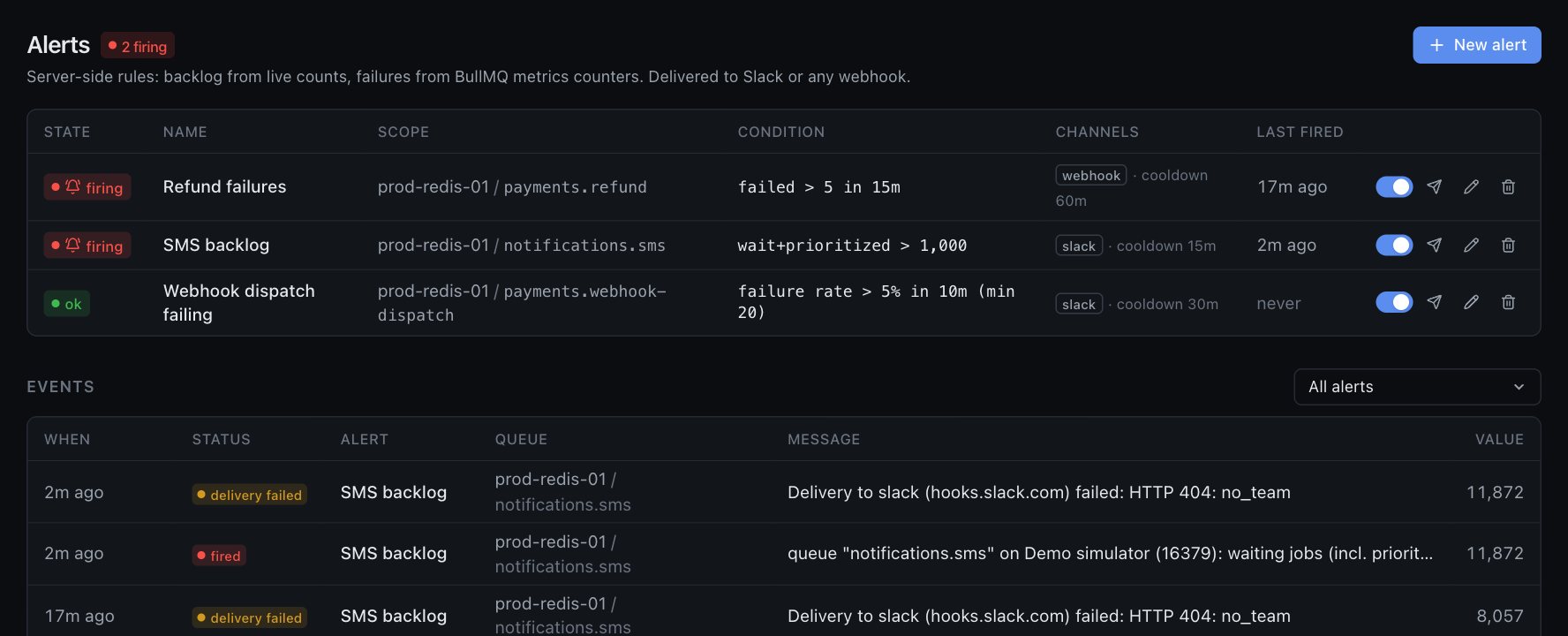
Per queue or per folder: waiting depth, failures, failure rate over a window. Delivered to Slack or any webhook, with a link straight to the queue.

Pro

Users & roles

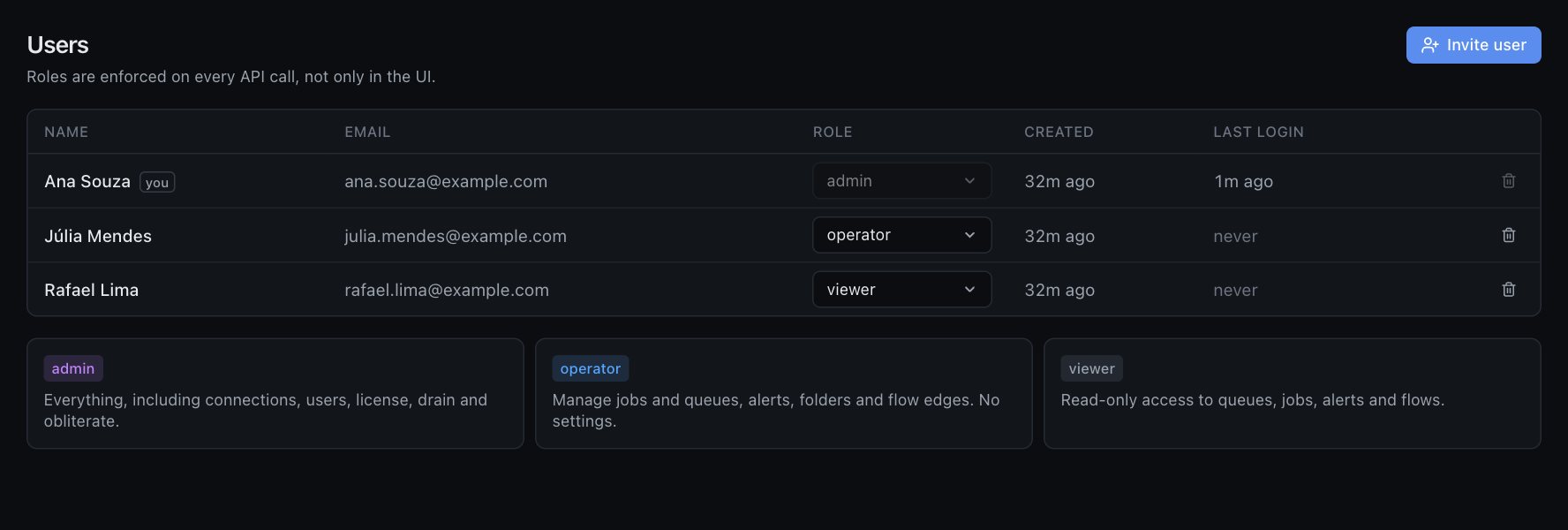
Admin, operator and viewer. Viewers see everything and change nothing; operators run the queues; only admins drain, obliterate or manage access.

Pro

Folders

Group hundreds of queues across connections by team, product or environment. Totals and alerts per folder.

Pro

Flow graph

Detected from your BullMQ flows, plus manual edges for the hops your code does by hand. See where a failure upstream will land.

Pro

Audit log

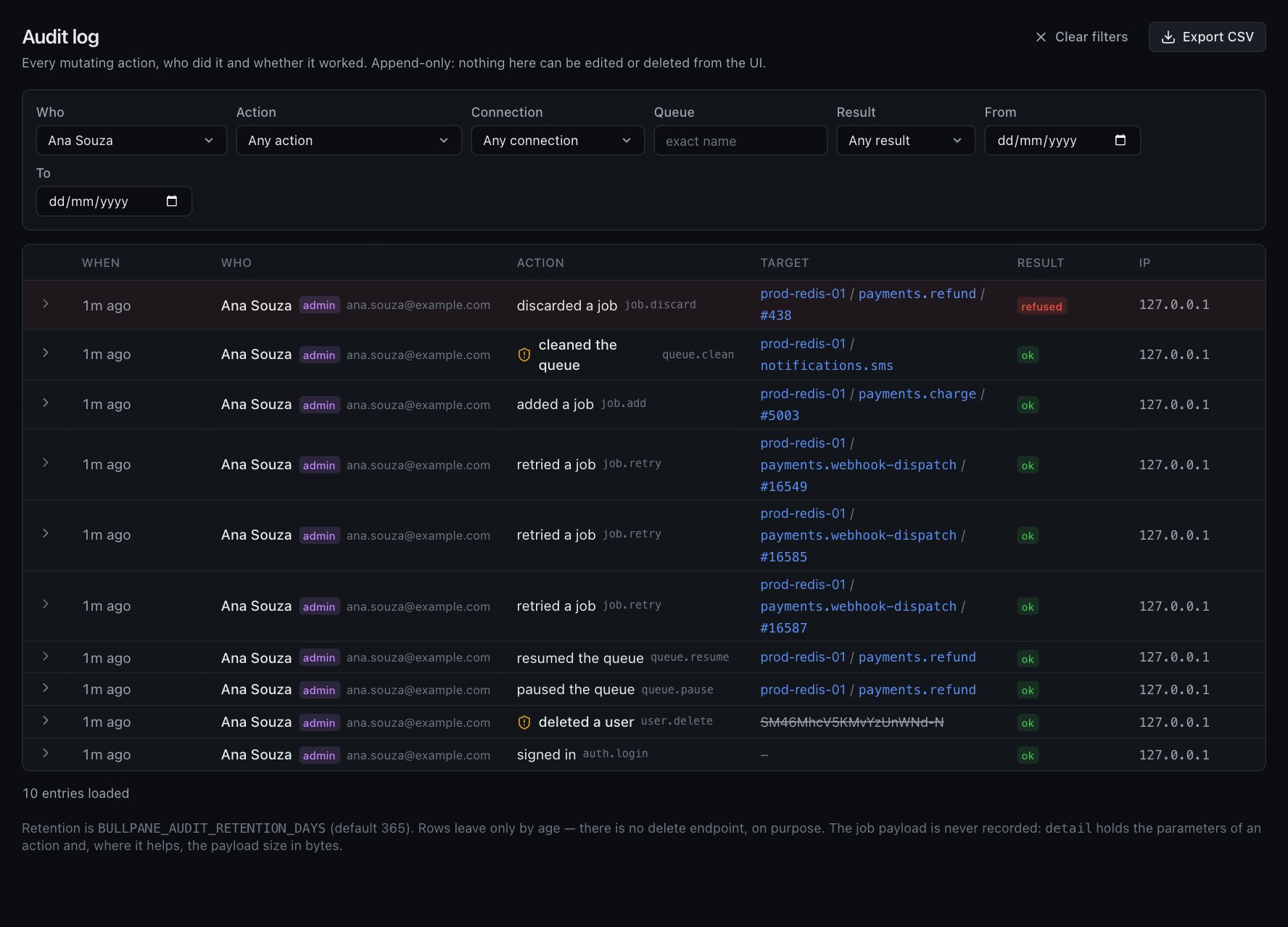
Who paused, cleaned or drained which queue, when, from which IP, including refused attempts. Persisted in your database, filterable, CSV export. Never stores job payloads.

Pro

Priority support

Email answered by the person who wrote the code, and a say in what gets built next.

Pricing

Per installation, not per connection, not per seat. Taxes and invoices are handled by Polar, our merchant of record, in your currency.

Free

$0
  • Unlimited connections and queues
  • Jobs, search, bulk actions
  • BullMQ Pro groups & batches
  • Single admin login
  • Read-only mode
Install

Pro · monthly

$19 / month
  • Everything in Free
  • Alerts to Slack / webhook
  • Users & roles
  • Folders and flow graph
  • Audit log with CSV export
  • Unlimited users, one installation
Get Pro monthly

Pro · yearly

$149 / year
Save 35% — 12 months for the price of 8
  • Everything in Pro monthly
  • One invoice a year for procurement
  • Cancel any time, data stays
Get Pro yearly

Questions

How does the license work?

You get a key on the receipt. Paste it in Settings → License. The server activates it once against bullpane.com and re-checks it daily. One key runs one installation; to move servers, remove the key on the old one (or from your customer portal) and paste it on the new one.

What if my server cannot reach the internet?

After a successful check the installation keeps Pro for seven days without any contact, and shows a "grace period" badge so you know. Air-gapped for real? Write to hello@bullpane.com for an offline key that never phones home.

Does anything about my queues leave my network?

No. The only thing the server ever sends to bullpane.com is the license key, a label for the installation (hostname) and the activation id. Job data, Redis URLs and queue names stay with you. The free edition sends nothing at all.

Does it work with BullMQ Pro?

Yes. Groups, batches and group concurrency are shown in both editions. Bullpane reads the same Redis keys your workers use; it does not bundle or redistribute BullMQ Pro.

Can it hurt my production Redis?

That was the design constraint. No KEYS, no unbounded scans, one Lua round trip per queue, payloads truncated inside Redis, discovery cached. Start with BULLPANE_READ_ONLY=true if you want to watch before you trust it.

What happens when I cancel?

The installation goes back to the free edition. Alerts, folders, users and the audit log stay in your database and become accessible again the moment a key is activated.

Which database does it need?

MySQL 8 (or MariaDB) for users, sessions, alerts and the audit log. Redis is only ever read, and written through the official BullMQ API for job actions.